Git Strategy
As we learned in the chapter “Git Strategy Pitfalls”, the GitHub Flow Branch strategy is not suitable for fixing bugs when it needs to be done in parallel with ongoing development. Therefore, we need to have a more suitable Git strategy that includes the GitHub Flow Branch strategy as its core. The following diagram provides a high-level explanation of environment-centric GitHub's Flow Branch strategy:
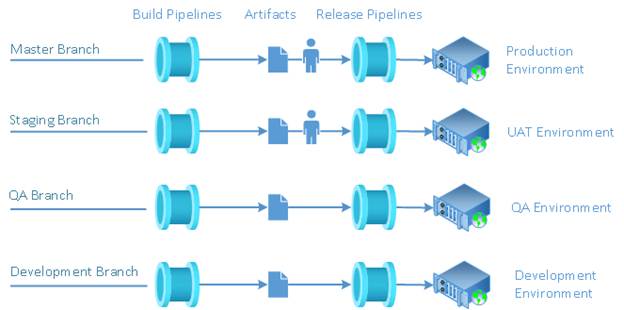
As you can see, we still have the same structure consisting of Master branch and elements of the CI / CD process, which we are familiar with from the chapter “Git Strategy Pitfalls”. But now we have used it three more times - once for the Staging branch, once for the QA branch, and once for the Development branch.
What are the benefits of having four branches with their own CI/CD processes? There are many, but the main one is the physical separation of development and bug fixing processes. This allows development to run in parallel with bug fixing without interfering with each other and without the complications we previously encountered with a single Master branch.
Let's take a look at how to use environment-centric GitHub's Flow Branch strategy in daily work. But before we can do that, we need to create three more branches — a Staging branch, a QA branch, and a Development branch.
Creating Branches
The starting point for using the environment-centric GitHub's Flow Branch strategy is the process of creating three additional branches – a Staging branch for the User Acceptance Testing (UAT) environment, a QA branch for the QA environment, and a Development branch for the Development environment. Here is the sequence of creating branches:
· Create a Staging branch from the Master branch
· Create a QA branch from the Staging branch
· Create a Development branch from the QA branch
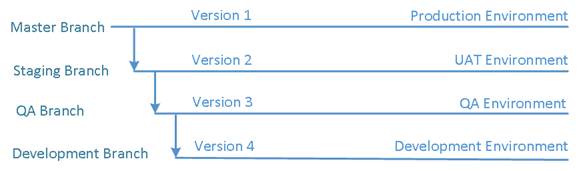
Creating branches in this order and specifying the origin of the branch from which the next branch is created is critical to avoid baseless merges during releases.
As a result of the initial branching, all four branches will have the same code, say version 1. But each branch targets the next version of the software once it is one level down in the branch hierarchy.
For example, the Staging branch is one level down relative to the Master branch, meaning it targets the next version of the software product, which is version 2. The QA branch is one level below the Staging branch, meaning it targets version 3 of the software product. The Development branch is one level below the QA branch, meaning it targets version 4 of the software product.
Merging Rules
The environment-centric GitHub's Flow Branch strategy strictly prohibits any merge between any branches except in two cases:
1. Merge up one level during release
2. Merge down one level during bug fix
Merge During Software Product Release
Suppose that version 1 of a software product is in production and at some point, a decision is made to release the next version of the software product:
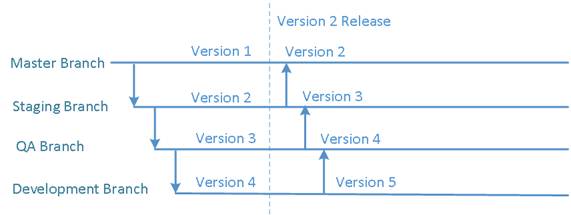
The release of version 2 consists of three steps:
· Merge the code for version 2 of the software product from the Staging branch into the Master branch
· Merge the code for version 3 of the software product from the QA branch into the Staging branch
· Merge the code for version 4 of the software product from the Development branch into the QA branch
Once the merges are complete, the development of version 5 of the software product can begin in the Development branch.
If at some point a decision is made to release version 3 of the software product into production, a similar sequence of merges will occur:
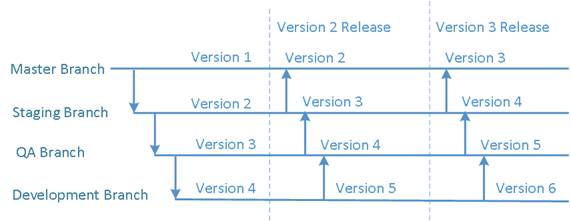
· Merge the code for version 3 of the software product from the Staging branch into the Master branch
· Merge the code for version 4 of the software product from the QA branch into the Staging branch
· Merge the code for version 5 of the software product from the Development branch into the QA branch
Once the merges are complete, the development of version 6 of the software product can begin in the Development branch. And so on.
No Merges During Development
The development follows the original GitHub Flow Branch strategy without any modifications, which consists of a sequence of branch (1) / merge (2) event pairs and the CI / CD process elements:
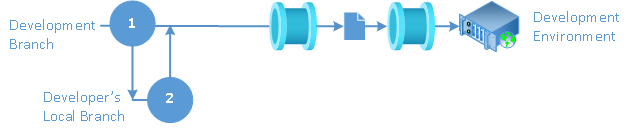
During development, there is no need to merge the development branch with any of the other three branches.
Merges After Bug Fixes in QA Branch
The bug fixing process on the QA branch also follows the GitHub Flow Branch strategy, consisting of the same sequence of branch (1) / merge (2) event pairs, but with one additional step (3) – merging the entire QA branch down into the Development branch after the fix is complete to incorporate the fix into future development:
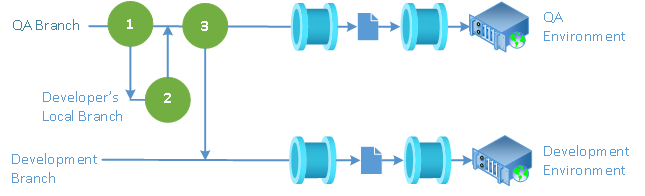
Merges After Bug Fixes in Staging Branch
The bug fixing process in Staging branch also follows the GitHub Flow Branch strategy, consisting of the same sequence of branch (1) /merge (2) event pairs, but with two additional steps – merging the entire Staging branch down into the QA branch after a fix is completed to include the fix in the version of the software product that the QA team is testing (3), and merging the entire QA branch down into the Development branch to include the fix in future development (4):
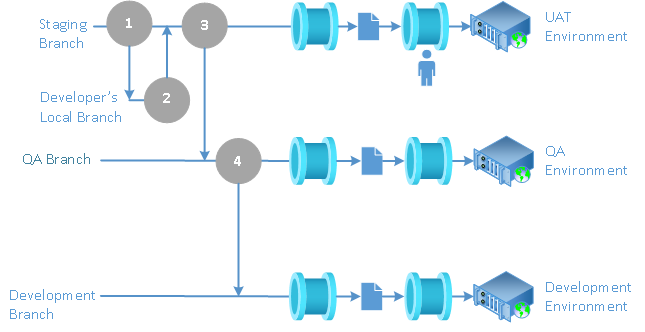
Merges After Bug Fixes in Master Branch
The process of fixing bugs in the Master branch also follows the GitHub Flow Branch strategy, consisting of the same sequence of branch (1) /merge (2) event pairs, but with three additional steps - merging the entire Master branch down into the Staging branch after the fix is complete to include the fix in the version of the software being tested by the UAT team (3), merging the entire Staging branch down into the QA branch to include the fix in the version of the software being tested by the QA team (4), and merging the entire QA branch down into the Development branch to include the fix in future development (5):
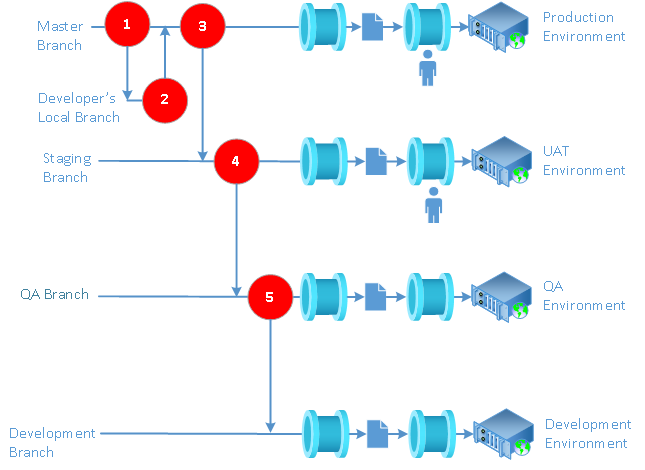
The CI/CD process is fully automated for the Development and QA branches. A dedicated user runs release pipelines for the Staging and Master branches.
Summary
Environment-centric GitHub's Flow Branch strategy is a very simple yet extremely effective solution that has been proven successful for over a decade in several different large-scale software development projects.
Table of Content Software Development Practices