Git Strategy Pitfalls and an Environment-Centric Solution
Introduction
Modern Git workflows such as GitHub Flow and trunk-based development have proven extremely effective for products that evolve continuously and are deployed frequently.
However, many business systems operate under a very different set of constraints. In these environments, software releases often represent contractual, regulatory, or operational milestones rather than incremental updates.
Software may move through several validation stages — development, testing, user acceptance, and controlled production release — before it becomes available to users.
Understanding how this difference affects source control strategy is essential for building reliable enterprise systems.
The Hidden Assumption Behind Common Git Flows
Modern Git and CI/CD practices are often designed around a single core assumption: that software can and should be deployed continuously.
Popular Git strategies therefore revolve around a single main branch that represents the current releasable version of the product. CI/CD pipelines then build, test, and deploy from that branch continuously.
This model implicitly assumes:
- Only one version of the product truly matters at any given time.
- Users accept frequent updates as normal behavior.
- Deploying often reduces risk rather than introducing it.
This approach works exceptionally well in products where users expect frequent change, incremental improvement, and rapid iteration.
Why Business Domains Break This Model
In business systems, software versions represent commitments:
- A version may be contractually agreed upon with clients.
- A version may be certified, audited, or approved by regulators.
- A version may be embedded in operational procedures or training.
In such environments, stability is often more valuable than speed. Changes must be deliberate, traceable, and predictable. Deploying new code too frequently can erode trust, even if the technical quality of the changes is high.
In these environments, frequent deployment may therefore be perceived not as progress, but as instability.
The Multi-Version Reality
The mismatch becomes most visible when an organization must support:
- Multiple released versions in parallel.
- Ongoing development for future versions.
- Production hotfixes for already-released versions.
In this situation, the main branch is typically ahead of production. It contains changes that are not yet approved, released, or even allowed to reach certain customers.
A simple “fix it in main and deploy” approach no longer works.
The Hotfix Cascade
When a production issue occurs, teams are forced into a more complex workflow:
- Identify the exact commit that corresponds to the released version.
- Create a hotfix branch from that historical state.
- Deploy a patched build specifically for that release.
The same fix then often needs to be reapplied manually to:
- The next version in QA or UAT.
- The version currently under active development.
What began as a streamlined CI/CD flow turns into a growing network of branches, merges, and version-specific pipelines.
What This Actually Means
This is not a failure of Git, nor of CI/CD itself. It is a failure to align tooling with the product’s release semantics.
When releases represent milestones rather than continuous evolution, the branching model must reflect the way software moves through environments before reaching production.
In practice, this means that:
- Release branches become first-class citizens.
- Each supported version has a clearly defined lifecycle.
- Automation targets specific release lines, not just “latest”.
Frequent Deployment Revisited
Frequent deployment works best when users expect continuous change.
In business domains where releases represent contractual or operational milestones, too-frequent updates can be perceived as instability rather than progress.
The solution is rarely to abandon automation. The solution is to align Git strategy, CI/CD pipelines, and release cadence with how the business actually consumes software.
A Practical Branching Strategy for Business Systems
The challenges described above do not arise from Git itself. They arise when a branching model designed for continuous deployment is applied to systems where releases represent contractual or operational milestones.
In such environments, software typically moves through several validation stages before reaching production. Development, quality assurance, user acceptance testing, and production support often operate in parallel.
A Git strategy that reflects this lifecycle can dramatically simplify release management.
The following approach introduces an environment-centric branching model in which long-lived branches correspond directly to deployment environments, and releases move through those environments in a controlled sequence.
This approach is called the Environment-Centric Release Promotion Flow.
Environment-Centric Release Promotion Flow
Plain GitHub Flow is elegant when the latest codebase is the only one that matters. However, as the previous sections demonstrated, it becomes much less suitable when bug fixing must happen in parallel with ongoing development, testing, and controlled releases.
In those environments, teams need a branching model that preserves the simplicity of GitHub Flow while aligning it with how the business actually consumes software.
The strategy described below does exactly that. It can be understood as an environment-centric variation of GitHub Flow, or, more precisely, as an Environment-Centric Release Promotion Flow implemented through long-lived branches.
Conceptual Overview
Before looking at the detailed branch diagrams, it helps to see the strategy as a software release lifecycle.
| Software release lifecycle | ||||||
|
Active Development New features and changes are being implemented. |
→ |
QA Validation The release is being tested to verify functionality and quality. |
→ |
Release Candidate / UAT The release is being validated by business users before production deployment. |
→ |
Production Release The approved release is live and used in production. |
|
Release Promotion to Environments
The release moves through environments from left to right. |
||||||
| Development | → | QA | → | Staging | → | Production |
|
Bug Fix Propagation
Bug fixes propagate in the opposite direction so all future versions preserve the correction. |
||||||
| Development | ← | QA | ← | Staging | ← | Production |
Each deployment environment has its own dedicated long-lived branch, which represents the code line associated with a specific environment:

This is not just a list of branches. It is an Environment-Centric Release Promotion Flow. Code is developed in the Development branch, promoted to QA for testing, promoted to Staging for user acceptance testing, and finally promoted to Master for production release.
In other words, each branch corresponds to a business-relevant state of the product:
- Master - the version currently released to production
- Staging - the next release candidate, usually used for UAT
- QA - the version currently being tested by QA
- Development - the line of active and future development
Why This Strategy Exists
The strategy exists to solve a very specific problem: production support and new development often need to proceed simultaneously. In a single-branch model, these activities interfere with each other. Production fixes risk pulling in unfinished work, and active development gets interrupted by release pressure.
With environment-centric branching, development and stabilization are physically separated. That separation makes several things easier:
- development can continue without destabilizing production support
- releases become explicit promotions rather than ad hoc merges
- hotfixes can be propagated in a disciplined manner
Establishing the Branch Hierarchy
The starting point is to create three additional branches under Master:
- Create
StagingfromMaster - Create
QAfromStaging - Create
DevelopmentfromQA

The order of branch creation matters because it establishes ancestry correctly. It is not just a setup detail. It is the foundation that keeps later merges meaningful. If the hierarchy is created incorrectly, future release merges can become baseless or misleading.
At the moment of creation, all four branches contain the same code. After that point, however, they begin to play different roles. They can be viewed as parallel release lines: the current production line, the next release candidate, the line under QA validation, and the future development line.
Architectural Invariant
Once the hierarchy is established, the branches must follow a strict containment rule.
Each branch represents a future release line of the product and must therefore contain the complete codebase of the branch representing the previous release line.
More concretely:
- Staging contains everything from Master, plus newer work for the next release.
- QA contains everything from Staging, plus additional work under validation.
- Development contains everything from QA, plus ongoing development for future releases.
This invariant ensures that every future release line already includes all fixes and functionality from earlier releases.
Merging Rules
The strategy stays manageable because it enforces three cross-branch merge patterns:
- Merge up one level during a release
- Merge down one level after a bug fix
- Never perform arbitrary merges between non-adjacent branches
Release Promotion
Suppose version 1 is currently in production. When the organization decides to release the next version, the release is performed by promoting each environment line upward by one level.

The release of version 2 consists of three promotions:
- Merge
StagingintoMaster - Merge
QAintoStaging - Merge
DevelopmentintoQA
After these promotions, each branch again represents the correct next environment state. The same pattern repeats when version 3 is later released.
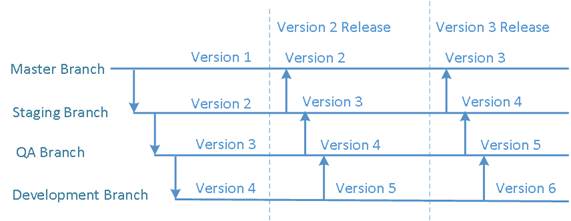
The release pattern repeats consistently for every new production version.
This is why the model scales well operationally: a release is no longer a special event that requires inventing a new process. It is simply controlled promotion through the flow.
No Cross-Branch Merges During Normal Development
Normal development inside the Development branch follows ordinary GitHub Flow. Developers create short-lived branches from Development, implement a change, and merge back into Development. No merge to QA, Staging, or Master is needed during day-to-day development.

This is a useful property of the model: it keeps daily development lightweight while still preserving strong release discipline.
Bug Fix Propagation
Bug fixes also follow GitHub Flow locally inside the affected long-lived branch. The additional rule is that after the fix is completed, it must be propagated downward one level at a time so that future code lines also receive it.
Bug Fixes in QA
If a bug is fixed in QA, the fix must also reach Development, because future work should not reintroduce the already-corrected defect.
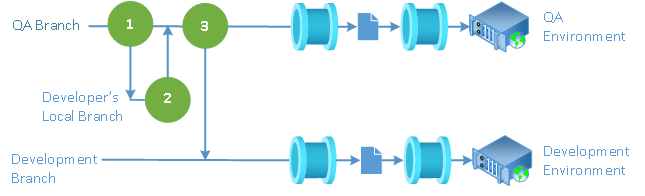
A fix made in QA is merged down into Development.
Bug Fixes in Staging
If a bug is fixed in Staging, the fix must first flow into QA and then into Development. This ensures that both the currently tested line and the future development line stay consistent with the release candidate.
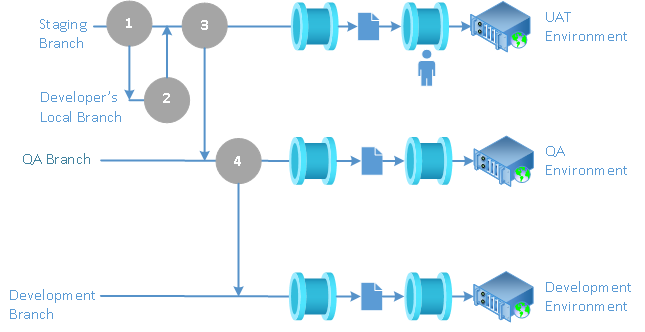
A fix made in Staging is merged down through QA and then into Development.
Bug Fixes in Master
If a bug is fixed in Master, the fix must be propagated to every lower line: first Staging, then QA, then Development. This is one of the major practical benefits of the strategy. Production hotfixes do not remain isolated; they become part of every future release line.
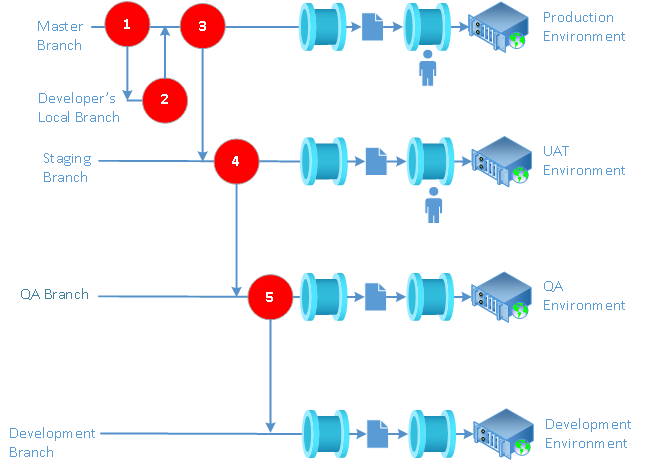
A production hotfix is merged down through all lower branches so the fix is preserved in future releases.
CI/CD Alignment
The CI/CD process should reflect the same environment model as the branches:
DevelopmentandQAcan usually be deployed automaticallyStagingandMastershould usually be released through controlled pipelines
This separation is not accidental. Development and QA optimize for feedback speed. Staging and Master optimize for control, accountability, and business confidence.
How This Differs from Plain GitHub Flow and GitFlow
Compared with Plain GitHub Flow
This strategy adds long-lived environment branches because a single main line is not enough when multiple release states must coexist.
Compared with Classic GitFlow
This strategy is more directly aligned with deployment environments. Instead of introducing temporary release branches as a separate concept, it makes the environment progression itself the organizing principle.
That difference is important. Readers often assume this is simply another form of GitFlow. It is related, but the mental model is different: the primary abstraction here is environment promotion, not branch taxonomy.
When to Use This Strategy
This strategy is especially useful when:
- releases are controlled business events rather than continuous deployments
- production stability is more important than deployment frequency
- the organization already has distinct Development, QA, UAT, and Production environments
- hotfixes must be applied safely without disrupting ongoing work
When Not to Use This Strategy
This strategy is usually unnecessary when:
- the product is a pure SaaS system with true continuous deployment
- only one actively supported version exists at a time
- the team is small and release governance is intentionally minimal
In such cases, a simpler GitHub Flow model may be more appropriate.
Summary
The Environment-Centric Release Promotion Flow is simple in its daily use but disciplined in its release semantics. Its strength comes from three ideas:
- each long-lived branch represents an environment-specific release line
- releases happen by promoting code upward one level at a time
- bug fixes are preserved by propagating them downward one level at a time
For business systems where releases are contractual, operational, or organizational milestones, this strategy provides a practical balance between development speed and release control.
In environments where releases represent business milestones rather than continuous deployment events, aligning Git strategy with the release lifecycle is essential for maintaining both development velocity and operational stability.
Table of Content Software Development Pitfalls Previous: Business Logic Development Pitfalls Next: Unit Testing Pitfalls in Business Domains
Business Process Programming in .Net
© 2004–2026 Laskarzhevsky Software Inc.
Unless otherwise noted, the content of this website is licensed under the
Creative Commons Attribution 4.0 International License (CC BY 4.0).
Code examples are provided under the MIT License.
You are free to share and adapt the material provided that appropriate
credit is given and any modifications are clearly indicated.
The information provided on this website is for educational purposes only.
The author and publisher make no warranties regarding the completeness
or suitability of the information and are not responsible for any damages
resulting from its use.