UML State Diagrams
In the previous chapters, we described business processes and sub-processes using activities, rules, and outcomes. We also used diagrams to show how work is performed.
In this chapter, we look at a different kind of diagram that focuses on states and how a process moves between them.
State Diagrams
A UML State Diagram describes a process or sub-process in terms of states. At any given moment, the process is in exactly one state and remains there until something causes it to move to another state.
A state can be understood as a waiting condition. While the process is in a state, nothing happens until a triggering event occurs.
Transitions
When a process moves from one state to another, this movement is called a transition.
A transition represents the execution of a set of activities performed according to business rules that move a process from its current state to a target state.
For example, verifying a health card may lead to different outcomes depending on the verification result.
The diagram below shows the “Person Identification” sub-process of a dental office information system using a clear, consolidated view:
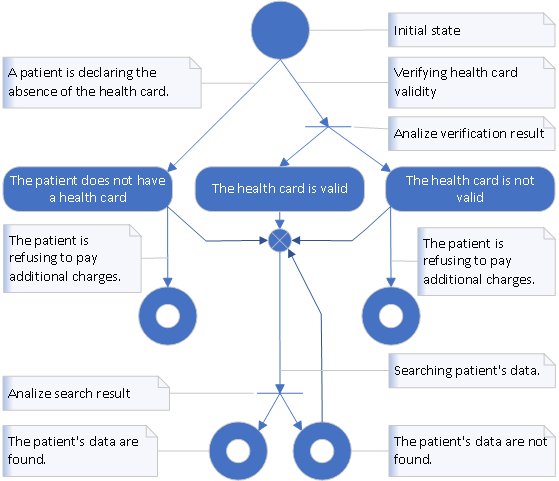
You can read a state diagram by following the arrows: the process waits in a state, then a trigger causes a transition, and rules determine which target state is reached.
Why State Diagrams Matter
State diagrams make it easy to see how a process behaves over time. They show where a process waits, what events move it forward, and what outcomes are possible.
This makes them especially useful when precise behavior matters, such as when modeling long-running business processes or implementing them in software.
In the next chapter, we will connect these ideas to a simple concept used in software: the finite state machine.
Table of Content Introduction into Business Process Previous: Business Sub-Process Modeling Next: Finite State Machine
Business Process Programming in .Net
© 2004–2026 Laskarzhevsky Software Inc.
Unless otherwise noted, the content of this website is licensed under the
Creative Commons Attribution 4.0 International License (CC BY 4.0).
Code examples are provided under the MIT License.
You are free to share and adapt the material provided that appropriate
credit is given and any modifications are clearly indicated.
The information provided on this website is for educational purposes only.
The author and publisher make no warranties regarding the completeness
or suitability of the information and are not responsible for any damages
resulting from its use.